



4.5+ Rating
100K+ Downloads
Privacy Protected
100% Free
Quick Status Saver – Save & Manage Statuses Easily
Download and save photos & videos from status stories with one tap — always have your favourite moments saved offline.
About Quick Status Saver
Quick Status Saver is a simple and efficient tool for saving images and videos from status stories directly to your device. With its clean interface and lightweight design, it lets you save favourites quickly, view them offline, and organize them easily — no logins, no complicated steps, just fast status saving and management.
Whether it’s a memory you want to keep, a story you liked, or a video you don’t want to lose, Quick Status Saver keeps everything in a neat built-in gallery so you can access anytime — even without internet.
Key Features
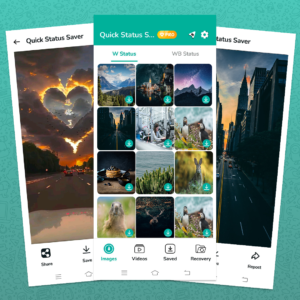
📥 One‑Tap Download: Quickly save any image or video status with a single tap.
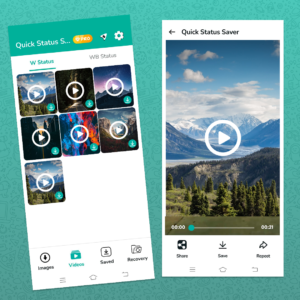
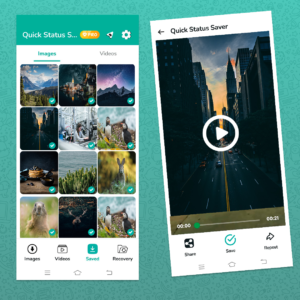
🖼 Built‑in Gallery: All saved statuses are stored within the app’s gallery for easy browsing and offline access.
🔄 Share or Repost Easily: Re‑share saved status content without going through extra steps.
⚡ Lightweight & Fast: Optimized for smooth performance and quick saving — works great even on low‑spec devices.
🔒 Privacy‑First: Saves files directly to your device — no sign‑in, no cloud upload, no unnecessary permissions or tracking.
📶 Offline Access: View your saved photos and videos anytime, even without internet.
Why Use Quick Status Saver
📁 Never lose favourite statuses: Keep stories, images, and videos permanently saved.
✅ Save time & avoid hassle: One tap saves status — no need to ask friends to forward.
🔐 Privacy & security: Everything stays on your device, you control what you save.
📱 Light and easy: Smooth performance, even on older or slow devices.
🌐 Access anytime: Gallery of saved statuses works offline — perfect for travel or poor internet areas.
How It Works (Simple Steps)
View the status you like in your messaging app (e.g. WhatsApp).
Open Quick Status Saver and refresh to load recent statuses.
Tap the image/video you want to save.
It’s saved instantly — now visible in the app’s gallery and your device storage.
App Info
Developer: Apps Jeeni Studio
Category: Communication / Utility
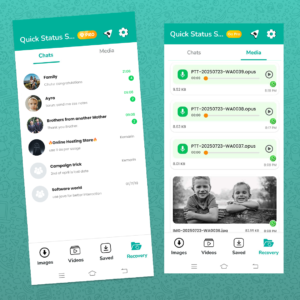
Inside the App
Yes — the app is free to download and use. Some versions may show ads or have optional in‑app features.
Yes — many status saver apps support saving from regular WhatsApp, WhatsApp Business, and GB WhatsApp or other mods. If your app detects statuses from these versions, users can save them just like standard WhatsApp statuses.
No — WhatsApp does not notify people when you save their status using a third‑party saver app. You are only viewing and saving media that you already had access to; the other person won’t get an alert when you save it.
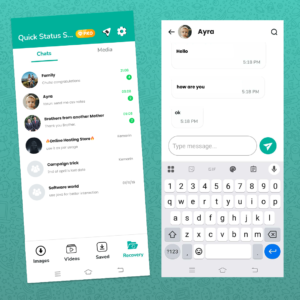
A status saver app itself doesn’t recover deleted WhatsApp chat media — it only saves statuses you choose. To recover deleted photos from chats, users need to restore from a WhatsApp backup (e.g., Google Drive or local backups), or use general Android data recovery tools. Without backups, recovery is often not possible.
Yes — most status saver apps store saved photos and videos locally on your device and don’t upload them to servers. They may collect limited device info for analytics, but your WhatsApp account login or private chats aren’t accessed or shared. Always read the privacy policy for details.